
An order in nine steps, ending at your front door
Use one carefully chosen item to follow CNFans’ nine official buying and shipping steps. Keep the scout question beside the order so the final parcel answers something specific, without treating one sample as proof about a whole seller.
This guide explains historical official screens. On 21 October 2026, the public CNFans site displayed a maintenance notice. Before a new purchase, confirm which services and payment methods are currently available in your account; the public notice alone does not establish the status of every account function.
Before ordering: sign up, then write a scout plan
You need a CNFans account, a way to pay, and a decision about what goes first. The registration page in the 23 August 2026 archive wanted a login name or email, the same password twice and the letters from a captcha image, and it linked to the terms and privacy statement. Read the current terms and privacy statement before using the account, and confirm which services are available to you.
Then pick the scout. Choose the item you most want, from the seller whose other listings you would buy next, in a category with a size table. Write down why you picked it and what you hope it will tell you. That note becomes the yardstick when the parcel arrives, and it keeps the first order from quietly growing into five items.
Watch the official CNFans walkthrough · 1:37
Historical official demonstration, 2025. The text and images below explain the nine steps. Payment methods, platforms, prices, storage counters and offers shown in the video are not current promises.
Open the original video ↗1. Search for the seller’s product
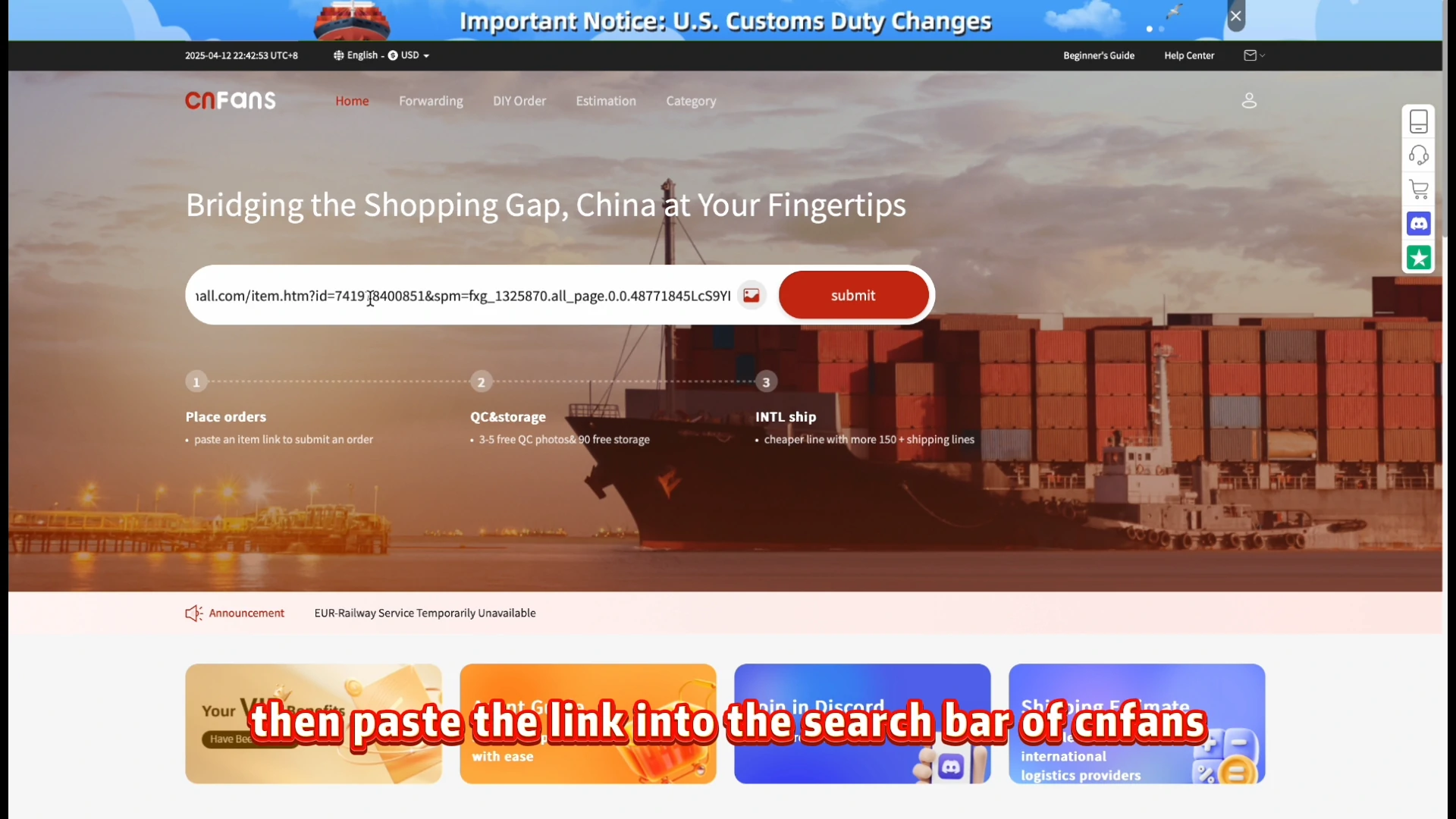
Start with the original seller URL, then paste it into CNFans’ product search. The historical demonstration uses the search field and Submit. Confirm that the result is the same seller and item; a similar photo or a catalogue card is not enough to identify the listing.
Open the card, then follow it to the seller's listing. On the listing, find three things: the option menu, the size table and what your chosen option actually costs. Menus are often headed 颜色 (color) and 尺码 (size). Option names can be plain numbers or vague words, so match the option to its small swatch image rather than to the order of the photos.
2. Confirm the option and submit the item
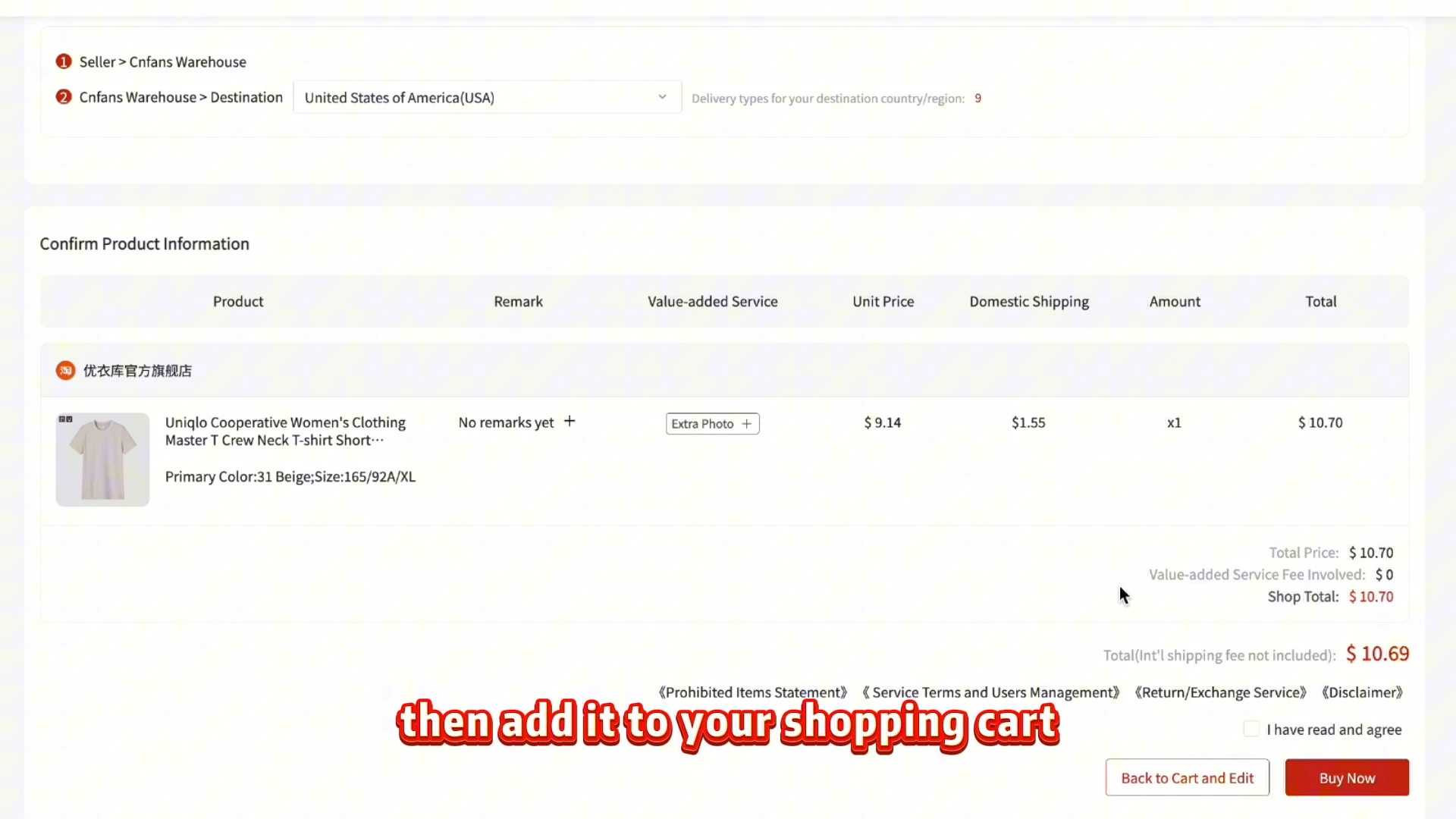
Choose the exact colour, size, version and quantity. Add the item to the cart or use the purchase action, then review the order summary, domestic postage, remark and any extra service. In the example, Back to Cart and Edit returns to the selection and Buy Now continues; neither means payment has succeeded.
Size tables can describe garment width, garment circumference, body measurements or a recommended weight range. Read the diagram and units before comparing. A number such as “chest 60” alone does not prove a flat width of 60 cm. Ask which measurement method was used, then measure your reference garment in the same way.
Prepare the seller URL, exact option and quantity. If the account offers a note field, request one specific check, such as “please photograph the hood lining for this option”. A note does not guarantee that a service is available or included; confirm any extra charge.
3. Pay the goods order, before international freight
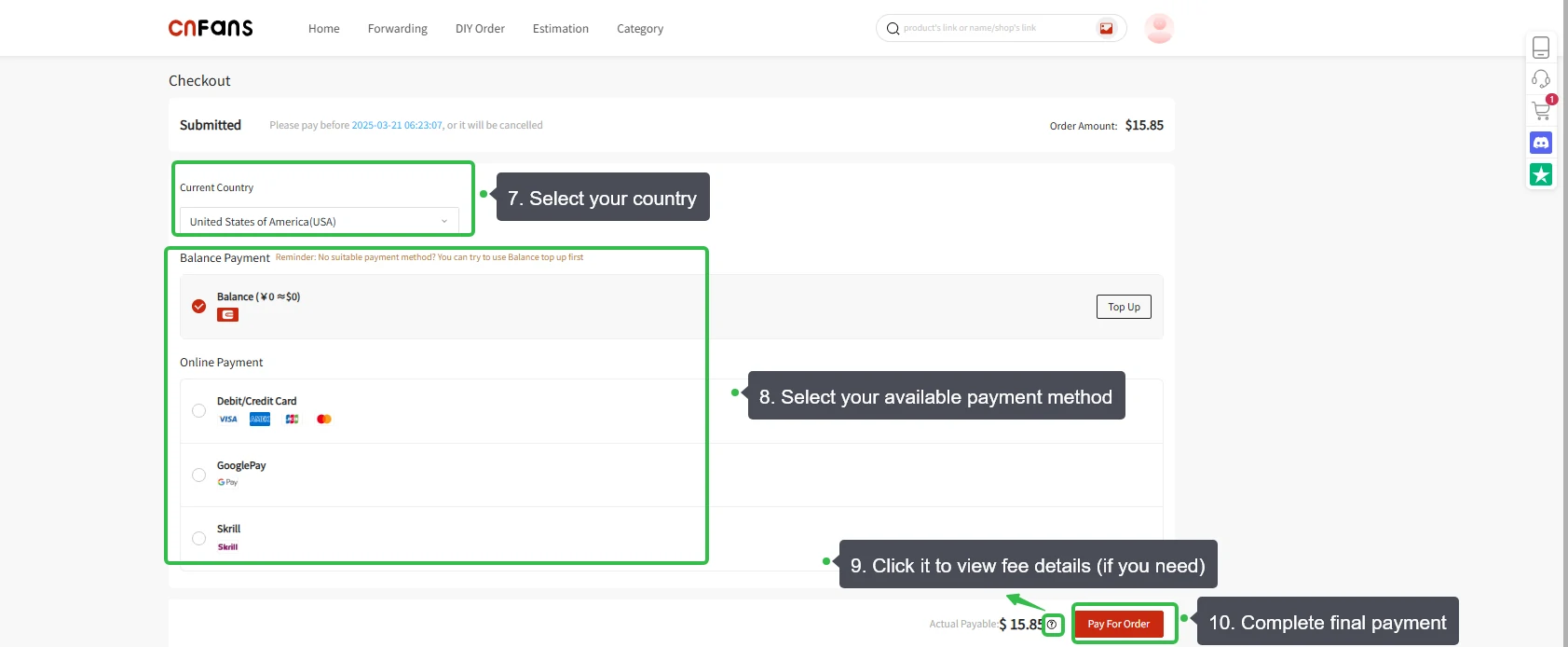
This payment is for the goods order, including domestic postage and any displayed service charges. International freight is a later decision. Check the destination, offered payment method, currency conversion and final payable amount before paying; keep the actual confirmation and order reference.
Before paying, re-read the option you selected against the listing. One avoidable first-order mistake is a wrong option: the right color in the wrong size, or a bundle you did not mean to buy. If the listing has options at different prices, the total should match the pricier option you chose, not the card price.
4. Check the agent’s purchase in Orders
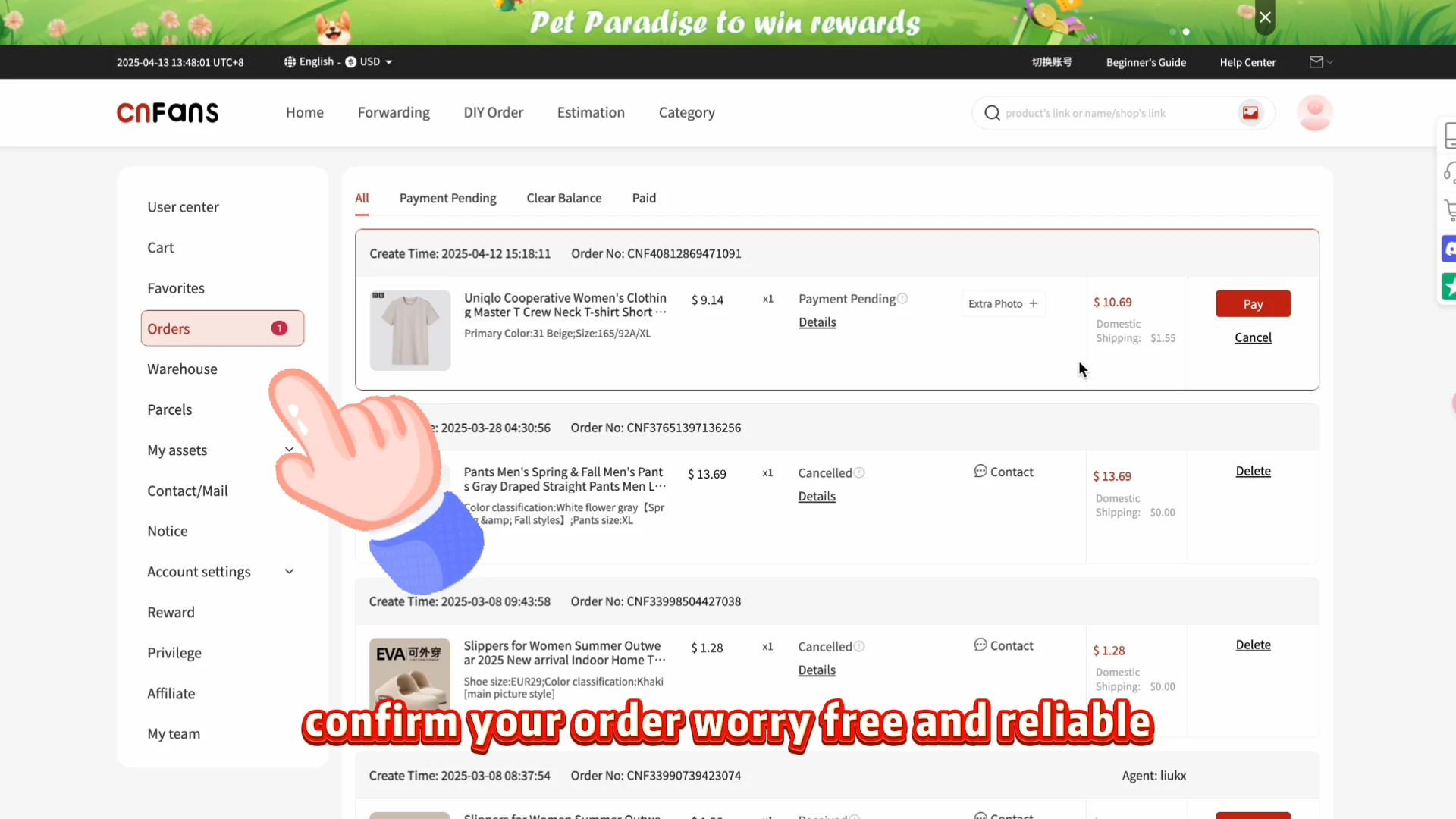
Open Orders and read the item’s real status and any message from the purchasing agent. Paying the order, the agent accepting it and the seller purchase being completed are separate events. Payment Pending is not a completed purchase, and Cancelled is not proof that a refund has arrived.
Payment, the agent’s purchase and the seller’s dispatch are separate stages. Read the actual status and messages: an unavailable option may require a decision to wait, change the selection or request cancellation. Confirm any approved refund and its destination instead of assuming it returns automatically to a balance.
5. Follow the seller’s delivery to the warehouse
After purchase, the seller sends the goods to the CNFans warehouse in China. Check seller dispatch and domestic tracking separately from the payment date. A courier delivery scan does not by itself mean warehouse intake or QC is complete. If a line is partially delivered, ask which items the seller parcel contained.
For a scout parcel, record payment, purchase confirmation, seller dispatch and warehouse arrival separately. The gap from payment to arrival includes agent handling, seller preparation, courier transit and possibly warehouse intake. It cannot be assigned to the seller from two dates alone.
6. Inspect the Warehouse record and QC photos
After intake, find the received item in Warehouse and open its available QC images. Compare the paid option, quantity, label and requested measurement with the evidence shown. A photograph cannot settle a hidden detail or guarantee authenticity, performance or fit. Ask about missing views and resolve a mismatch before international shipment.
Once the item reaches the warehouse it is weighed and photographed, and you get to look before anything goes abroad. Raise a question while the item is still at the warehouse and check the applicable deadline. Compare the photos with the listing: option, color, print placement, obvious flaws. If you asked for a measurement, check the tape in the picture against the size table.
If something is wrong, this is when to ask about swapping it with the seller or sending it back for a refund, which is far simpler inside China than after the parcel has crossed a border. The warehouse photos page covers how to read the pictures and what to request.
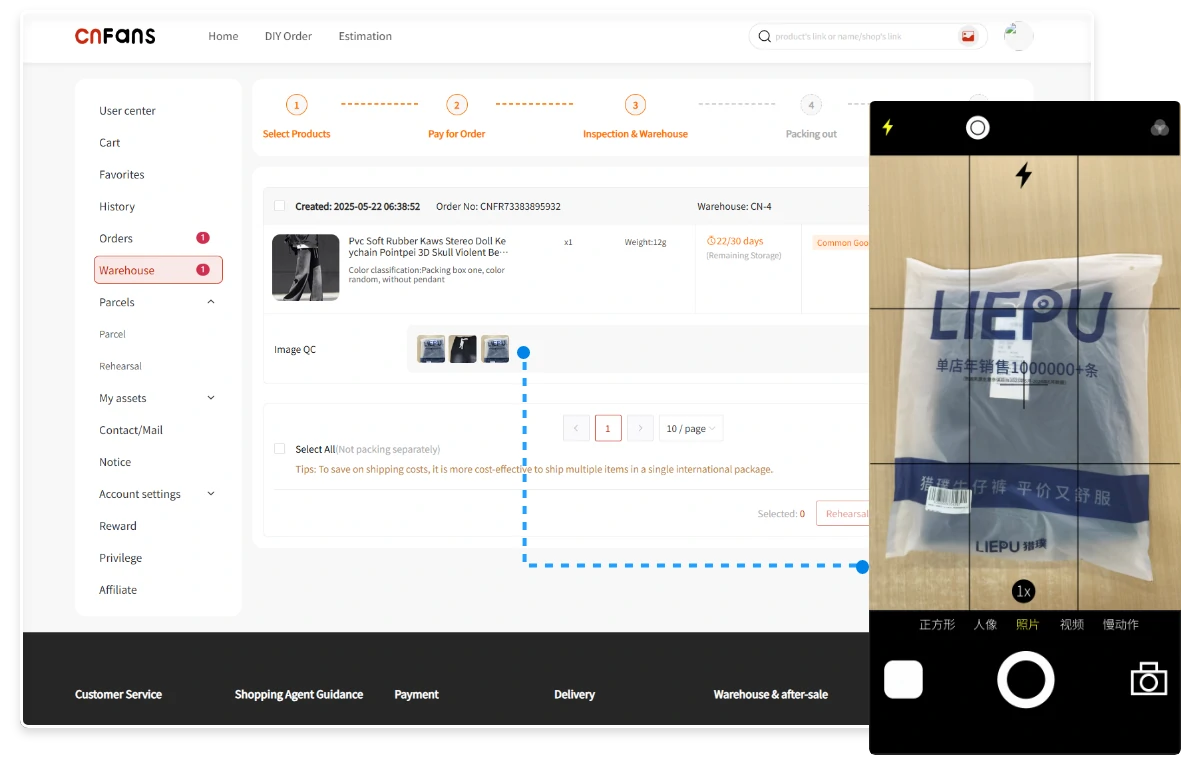
7. Select cleared items and request outbound shipping
Select only the Warehouse items you intend to send together, then check the destination, storage status and outbound eligibility. The demonstration shows the item checkbox, Rehearsal Packing and Submit. Resolve an Expired status or other restriction before relying on the selection. Confirm any rehearsal, packing or storage charge separately.
When you ask CNFans to ship, you choose which stored items go together and which line carries them. Lines differ in price, speed and what they accept; most charge by weight in bands, with an opening band you pay even for a light parcel. Bulky soft items can be charged by volume instead of weight on some lines. The shipping page explains bands and volume.
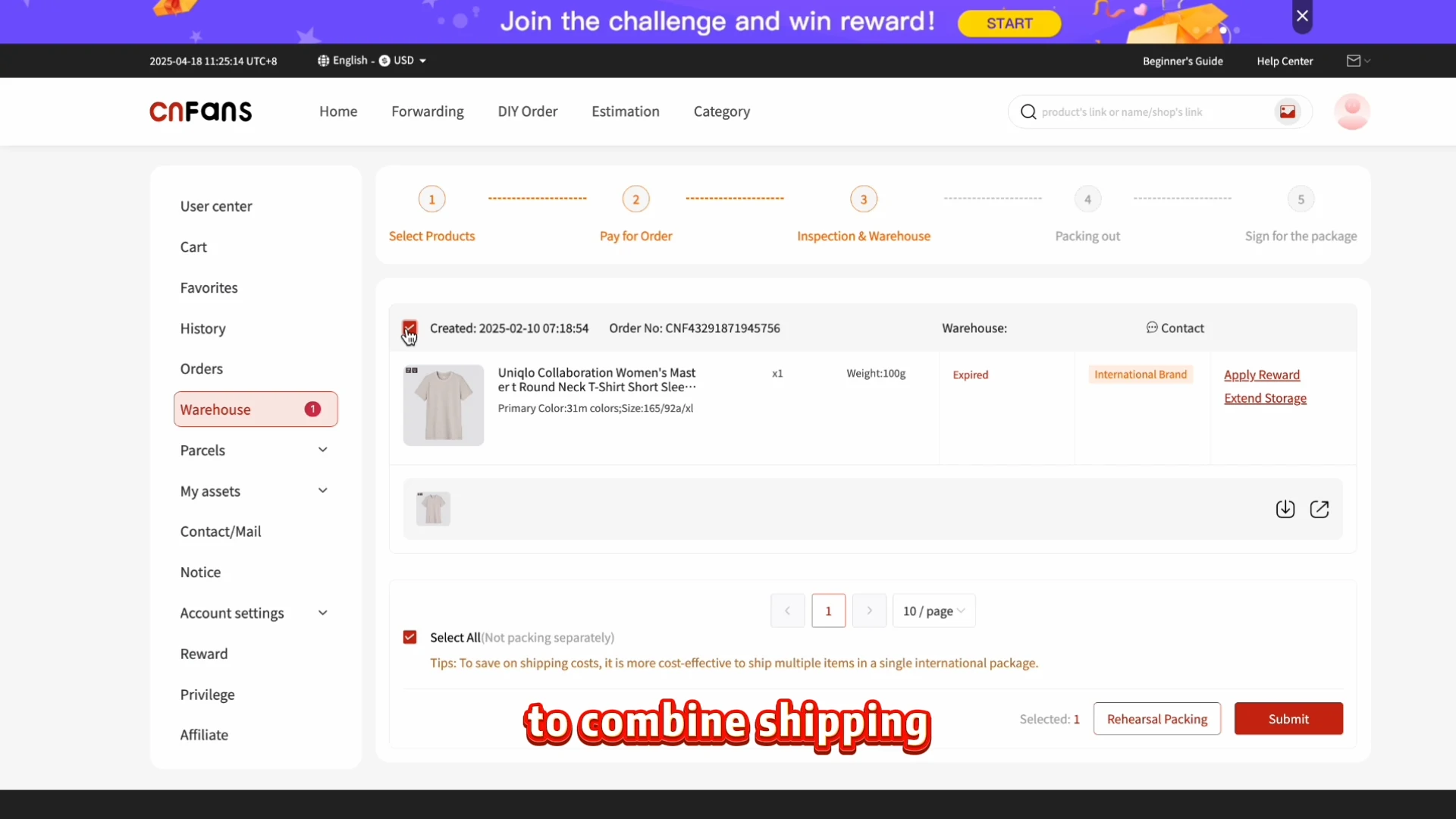
8. Choose the route and pay international freight
After the outbound request, compare the lines actually offered for the destination and contents, then review the shipping bill before paying. Check the chargeable weight or volume, packing and any optional service. An initial estimate may change after packing; keep the quotation, settlement and parcel reference.
If a future order is likely to use the same line, a scout shipment can give a dated reference. Check eligibility and total cost first: a larger or different parcel may need another line, and one shipment does not predict the next transit time.
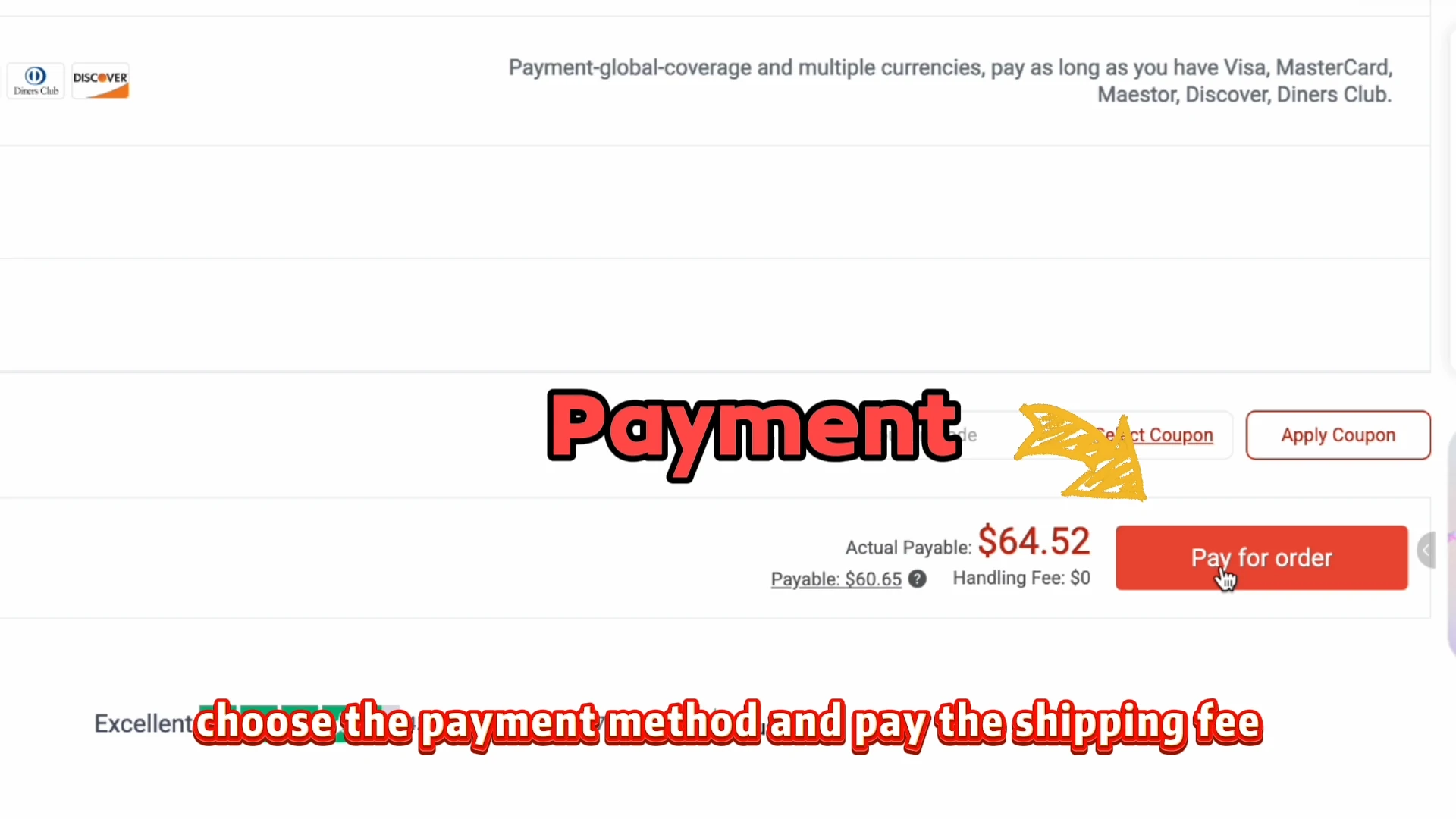
9. Follow the parcel after dispatch
After dispatch, use Parcels and the assigned tracking information to follow the shipment. A paid freight bill or submitted request alone does not establish that a carrier has the parcel. Keep the parcel ID, dispatch record and tracking number together; ask the agent to investigate an unexplained delay rather than inferring a location from silence.
In transit, save the tracking number and note when the parcel leaves China, when it reaches your country and when it is delivered. If your country charges import tax or a handling fee on small parcels, the carrier or postal service will contact you; follow your own customs authority's guidance, which this site does not try to interpret.
When it arrives, try the item on, compare it with your own garment and the size table, look at it in daylight, and write the scout report the same day: size verdict, color verdict, fabric verdict, total days. Then open the carry-over map and decide what the report means for the next order.
Using this site and CNFans side by side
The jobs split cleanly. Use the catalog aisles and the search box to find candidates. Use the seller's listing to confirm options and measurements. Use CNFans to buy, inspect and ship. Use the scout report and the carry-over map to identify references worth comparing with each current listing. They do not approve another product or batch.
Nothing on this site places an order, holds money or sees your CNFans account. If an order needs changing, only CNFans support can do it; the address printed on its current notice is [email protected].
Plan a scout around one unanswered question
Suppose the question is whether a hoodie’s fabric feels substantial enough. A seller image can show its shape and a warehouse photo can reveal an obvious mismatch, but neither lets you feel the fabric. That is a reason to consider a physical sample. It is not a reason to assume the seller’s tees will use the same material.
- Write the question before ordering: for example, “Is this exact hoodie comfortable at a 60 cm flat chest width?”
- Save its current size chart, selected option and claimed fabric. Keep the reference garment you measured at home.
- At warehouse arrival, resolve any wrong option or unreadable measurement before deciding on international shipping.
- Compare the separate parcel quote with the cost of waiting and consolidating. Use the current quote; an old shipment’s charge is only history.
- After delivery, write the answer against this item and batch. Carry the measurement as a reference, not a blanket approval for the next order.
The reference checker now treats all product comparisons as partial. If your only unanswered question is a visible dimension, ask about a clear measurement photo before paying for a second journey.