
Warehouse photos, the first report on any CNFans item
Before an item leaves China, the warehouse photographs it. Those pictures, usually called QC photos, are the cheapest place to catch a mistake. Below: what they show, how to read them, and what a scout parcel still adds.
QC photos, and why their timing makes them valuable
QC stands for quality check. When an item reaches an agent's warehouse, staff open the seller's package, photograph the item and note its weight, then store it until you ship. CNFans listed this as the third part of its service in the 23 August 2026 archive of its front page, describing a check of defects, sizes and color on arrival.
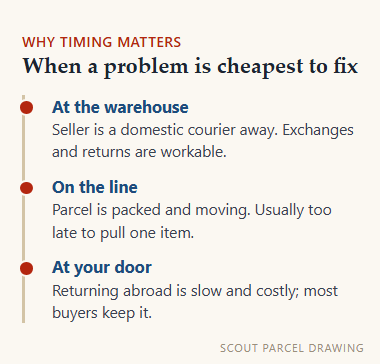
The photos matter because of timing. While the item is still in China, an exchange or return to the seller is a domestic matter and usually workable. Once it has crossed a border, returning it is slow and expensive enough that most buyers simply keep the mistake. Every minute spent on the QC photos is cheaper than any minute spent after delivery.
Five looks, always in the same order
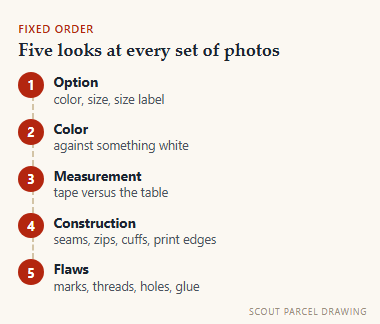
Learning how to check QC pictures properly mostly means using the same order every time. First look: is it the option you ordered, color and size, with any size label visible. Second: does the color match the listing, judged against something white in the frame. Third: does any tape measurement in the photos agree with the size table. Fourth: construction, meaning seams, zips, cuffs and the edges of prints. Fifth: flaws such as marks, pulled threads, holes or glue.
Only after all five, decide. A habit of reading each set of QC pictures in that fixed sequence is what turns them from a quick glance into a real check, and it makes your notes comparable across orders.
Where the tape should start and stop
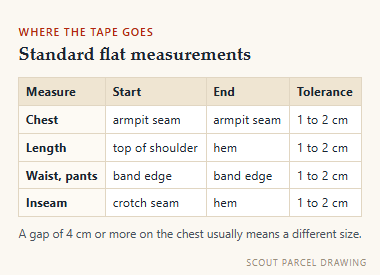
Warehouse measurements are taken the same way as the size table: garment flat, tape across. Check where the tape starts and ends. Chest is measured armpit to armpit just below the sleeve seam; length from the top of the shoulder seam down to the hem; waist on pants across the top band. A tape laid at a slant or starting a few centimeters in can make a correct garment look wrong.
Allow a centimeter or two of difference; hand measurements of soft fabric are never exact. A gap of four or five centimeters on the chest is a different size, and that is worth raising before shipping.
Color: why warehouse light shifts it a little
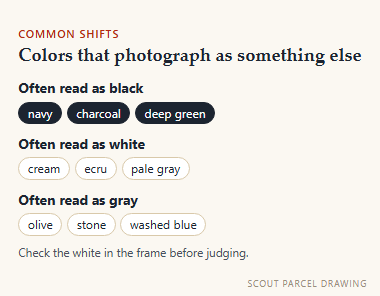
Warehouse photos are taken quickly under artificial light, and phone cameras adjust color automatically. Dark navy can read as black, cream as white, olive as gray. Look for a white surface or label in the frame; if the white looks blue or yellow, shift your judgment of the garment the same way.
If color is the reason you chose the item, ask for one photo near a window or next to a white sheet. An item in hand lets you judge that item's colour in your own light. It does not calibrate future warehouse pictures: lighting, cameras and batches can change.
Asking for more: one request, one line
Agents generally let you request extra photos or a specific measurement, sometimes for a small fee. Whether CNFans charges for this was not stated in its archived pages; check the Inspection Information article when the shop returns. Whatever the price, a precise request gets a precise answer.
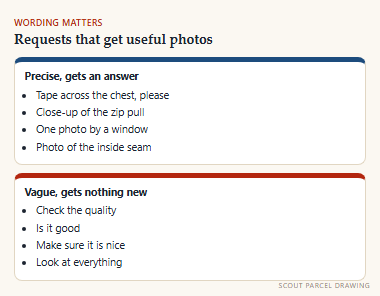
Ask for one thing per line: "photo of the hood lining", "tape across the chest", "close-up of the zip pull", "photo by a window". Vague requests such as "check quality" produce the same generic photos you already have.
A warehouse photo that shows something wrong
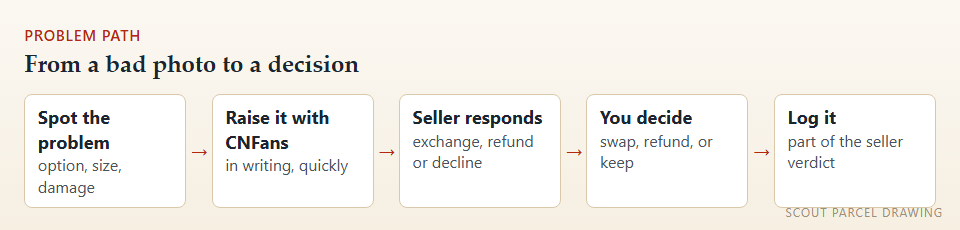
If the option is wrong, the measurement is far off or there is visible damage, raise it with CNFans while the item is at the warehouse. The usual choices across agents are an exchange with the seller, a return for a refund, or accepting the item as it is. Sellers and marketplaces set their own time limits on returns, so act within days, not weeks.
Keep the conversation in writing inside your CNFans account and save the photos. If the scout item itself turns out wrong, that is already a result: you have learned something about the seller without risking a whole haul on it.
The QC tab on catalog entries
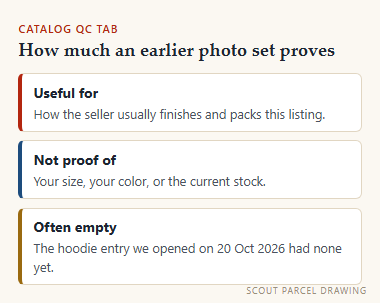
Catalog entry pages have their own QC tab, meant for warehouse photos from earlier orders of the same listing. On the hoodie entry we opened on 20 October 2026 the tab said no QC photos had been uploaded yet, which is common. When an entry does carry earlier photos, they show what someone else's item looked like on some past date.
Use those photos as a preview of the seller's habits, not as a promise about your item. Stock changes, and one buyer's good photo set does not cover the next production run. Your own warehouse photos are the ones that count.
Photos and the scout: dividing the work
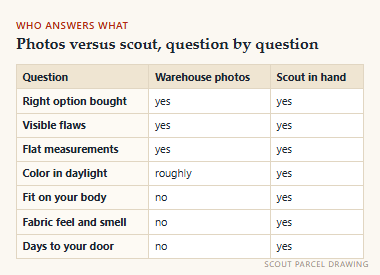
Between them, warehouse photos and a scout parcel cover every question about an item. The photos handle the option, visible flaws, rough color and flat measurements. The scout handles fit on your body, fabric feel, true color in daylight, smell and the real number of days. Use the photos to their limit on every order; use a scout only for what they cannot reach.
After a good scout, your QC reading for that seller can get faster. You already know their tables and their colors, so a quick five-look pass is enough and the follow-up items can ship together.
One shoe in a seller photo leaves the pair untested
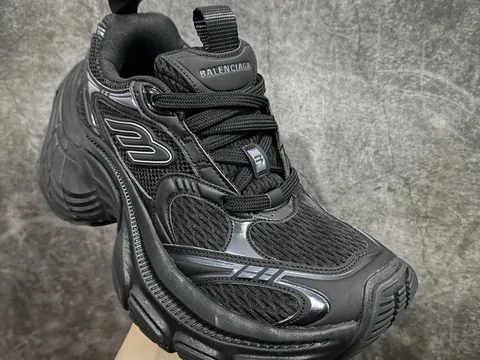
You can see the front, lacing and some side panels. You cannot see a pair, two matching size labels, the sole of each shoe or a readable insole measurement. The brand text on the shoe is not an authenticity test.
For your received pair, ask for both shoes together and their labels if those views are absent. If the problem is fit, request the exact insole or internal measurement you need and check how it was taken. A wide-angle close-up can exaggerate the toe and cannot establish size.
A previous scout from this seller is useful background, but each new pair still needs its own evidence. Different models and batches can change shape, construction and sizing even when the shop name stays the same.